Monday, December 16, 2013

3. Understand code of Example

3. Understand code of Example

Metaio Example app has code of Tutorial 1 to 8, I am going to explain only code of Tutorial 1, Most enjoyable feature of Metaio SDK is “You don’t require NDK code” (I like this feature)

Files & Description

  • Tutorial1.java: It extends ARViewActivity, not by Android Activity, We need to use getUILayout() function to provide xml layout and in loadContents() method we need to provide tracker configuration xml file and content file md2 or obj
  • tutorial1.xml: It has only one image button, nothing else
  • TrackingData_MarkerlessFast.xml: This xml is placed in in Assets/Tutorial1/Assets1, It has all require configuration for tracker, i.e. tracker image, sensor, algorithm use.
  • metaioman.md2: This is our metaioman 3D object which display when tracker found in camera.
That’s all, we don’t require NDK, C++ or OpenGL.
Metaio also provides cool feature “AREL” – Augmented Reality Experience Language, you might notice AREL button in Tutorial 1,  AREAL is more simpler then normal method. Click here to know more about AREL
 

2. Compile and execute example_sdk application

2. Compile and execute example_sdk application

Step 1: Open eclipse
Step 2: Click File->Import->Android->Existing Android Code Into Eclipse
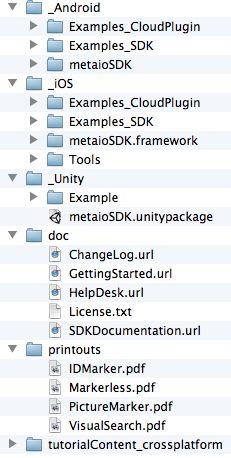
Step 3: Navigate to metaioSDK folder and go to _Android and click next
Step 4: Eclipse will list all Android projects under _Android directory
Step 5: Select metaioSDK and Example_SDK, unselect other projects
Step 6: Click finish, eclipse will import two projects
Step 7: Right click on “ImageTargats” project -> select run -> Android Application
Step 8: Print PictureMarker.pdf and put your phone in front of printout, App will display 3d object of metaioman
Note: do clean & build if you find error of R.java and make sure that you have android sdk version 2.3 and higher in metaiosdk and example project

Augmented Reality : Introduction of Metaio SD

Augmented Reality : Introduction of Metaio SD

Metaio SDK is advanced as compared to Vuforia SDK, Metaio SDK is developer friendly such that any beginner or novice developer can develop good quality of AR application.

High-level system overview

overview-02

1. Setup Metaio SDK 4.5

I assume that you already have Android SDK and NDK setup in computer.
Step 1: Download Metaio SDK 4.5 for Android
  • http://dev.metaio.com/sdk/getting-started/
Step 2: Double click on metaio_4.5_mac.dmg, It will ask for terms & condition, click “Agree”
Step 3: Drag & Drop mataioSDK folder to your desire location
sdk-ls
Step 4: _Android Directory has Android SDK

Sunday, December 15, 2013

Xcode 4.0 Developer Preview 5 Release Notes

Xcode 4.0 Developer Preview 5 Release Notes

New Features

General

  • The build action in the scheme dialog allows you to choose which targets should be built for each scheme action. 8025069
  • Each scheme action specifies the build configuration to use when Xcode performs that action as part of a build. Setting up a scheme with scheme actions that use particular build configurations allows you to, for example, set up a scheme that runs the product with the Debug configuration but profiles it with the Release configuration. 8090845
  • The Build and Archive command archives the products of the targets selected in the active scheme for archival, including their dSYM files. You submit your products to iTunes Connect using these archives. You can also use them to symbolicate crash logs. 7696041
  • The post-action scripts of archive scheme actions have access to information about the just-built archive in their environment:
    • ARCHIVE_PATH: The path to the archive.
    • ARCHIVE_PRODUCTS_PATH: The installation location for the archived product.
    • ARCHIVE_DSYMS_PATH: The path to the product’s dSYM files. 8423449
  • Xcode detects and enforces implicit build dependencies between targets when you build a scheme. You can turn this off per scheme in a scheme’s build action. 7879553
  • When the active scheme is a unit-test scheme, clicking Run in the toolbar produces an unknown error dialog.
    To run unit tests, choose Product > Test. 8642393
  • Fix-it is not supported in iOS application projects created using the new project dialog. The iOS project templates have the compiler set to LLVM-GCC, which does not support Fix-it.
    After creating an iOS project, set the compiler to LLVM 2.0. 8607314

Editing Core Data Models

  • You can create NSManagedObject subclasses from entities in a Core Data data model. 7484772

Refactoring

  • The Extract transformation is supported. 7711619

Compiling: LLVM 2.0

  • Blocks:Goto statements within blocks are allowed when the target is within the block. 7549164
  • Objective-C: Fixes bugs in exception handling present in LLVM 1.5. 8160285
  • You can declare instance variables in class implementations and extensions (iOS and 64-bit OS X). 7538989

Analyzing OpenGL ES Performance

  • The OpenGL ES Performance Detective identifies graphics bottlenecks in your iOS applications. It is located in <Xcode>/Applications/Graphics Tools. 8208239
  • Runs of the OpenGL ES Analyzer instrument can be saved in Instruments traces. 7993423
  • The OpenGL ES Analyzer instrument supports extended filtering of the OpenGL ES trace. 7976717
  • The OpenGL ES Analyzer instrument provides single-frame navigation, which allows you to focus all instruments on a specific OpenGL frame, and to step backward and forward in the trace frame by frame. 8552970

Enhancements

General

  • You can access the values of the build settings of the target being built through environment variables and launch arguments. When you create custom executables (by changing the value of the Executable setting in Run and Profile scheme actions), you can specify the target against which to expand the environment variables and launch arguments. 7546808

Editing Nib Files

  • Xcode suggests key path completions in the bindings inspector as you type. To take advantage of this feature, specify the class of object being managed by your controller in the attributes inspector.
    Xcode uses the project’s symbol index to generate the key path completions. 8176168

Editing Source Code

  • There’s an additional gesture to jump to a symbol definition in the source editor: holding down the Command key. When you hold down Command, Xcode represents the symbol under the pointer as a hyperlink; you can move the pointer between symbols until Xcode highlights the one you want to act on. You can then click the symbol to jump to its definition. Other modifies keys behave as expected. 8459719

Task Information and Alerts

  • The activity viewer presents more detailed information about scheme-related tasks, such as building a product. 7982481

Changes

Editing Nib Files

  • Hidden views are invisible in the Interface Builder canvas (they used to be partially visible in Interface Builder 3, part of Xcode 3).
    To work with these views, select them in the jump bar or the outline view. 8059339

Building: xcodebuild

  • The xcodebuild -activetarget option is no longer supported. 8361726

Resolved Issues

General

  • In General preferences, you can specify that Xcode ask you where to open a file you click or double-click while holding down an modifier key in a navigator. 8476034
  • Xcode automatically creates schemes for all targets in a project when you open an Xcode 3.x–based project. It doesn’t skip targets that other targets depend on.
    You can delete or hide schemes you don’t need in the manage schemes dialog. 8016676
  • Setting General preferences > Build Location > “Shared subfolder” to an absolute path doesn’t generate an assertion failure when opening projects. 8368913

Editing Nib Files

  • Many performance problems with making connections are resolved. In particular, the performance of connecting to the First Responder has been drastically improved. 8280101
  • You can create an Interface Builder–to–source connection even the target source code is folded. 8472539

Editing Core Data Model Files

  • When you create NSManagedObject subclasses from entities in a Core Data data model, Xcode ask for confirmation before overwriting existing files. 8506607

Editing Source Code

  • Breakpoints and message bubbles appear in the source editor even when code is folded above them. 7192871

Compiling: LLVM 2.0

  • C++: Several bugs related to using blocks are fixed. 6182276

Analyzing OpenGL ES Performance

  • API statistics in the OpenGL ES Analyzer instrument are computed correctly. 8549379

Help and Documentation Content

  • The list of help topics in a help book appears, as expected, when accessing help books in the documentation organizer. 8430699

New Issues

Comparing Versions of a File

  • After you create a branch and switch to it in the repositories organizer, using the commit dialog or the version editor causes an assertion failure.
    Restart Xcode after creating a branch and switching to it. 8383245

Known Issues

General

  • Interface Builder files with explicit Xcode 3 file types open in the source editor instead of in Interface Builder.
    Set the file type of the Interface Builder file in the Identity and Type inspector to “Default,” deselect it in the project navigator, and select it again. 8028406
  • The task log viewer is empty when you select the last build task of a project or workspace in the log navigator and the viewer is set to show only recent operations.
    Set the task log viewer to show all operations. 8350930

Editing Nib Files

  • Xcode cannot edit OS X–type Interface Builder documents comprised of objects from frameworks other than AppKit.
    You can compile and run these documents, however. 7470836
  • Refactoring: Xcode does not refactor Cocoa bindings. 8423815

Searching

  • Search navigator: Xcode may crash in the replace preview dialog of the search navigator when all the found instances are selected and you click Replace. 8091532

Refactoring

  • Xcode does not create a snapshot of your workspace before performing a refactoring transformation.
    Create manual snapshots before performing refactoring transformations. 7816256
  • Editing nib files: The Rename transformation may not work properly action methods in Interface Builder documents when the action’s target is the first responder or the method is declared in a category, protocol, or a superclass of the given class. 8500272

Source Control and Snapshots

  • Xcode doesn’t recognize SCP-based URLs for Git repositories in the Repositories organizer.
    Use the SSH-based URLs. For example, instead of git@example.com:/myrepositoryname.git use ssh://git@example.com/myrepositoryname.git. 8044145

Building

  • Xcode doesn’t use a new build location after you change General preferences > Build Location.
    Close and reopen open projects and workspaces after changing the build location. 7965261

Help and Documentation Content

  • These help books are not listed on the Xcode Application Help page (Help > Xcode Application Help): Interface Builder Help, Task and Session Log Viewer Help, Symbol Navigator Help, and Xcode Concepts.
    Search for these titles in the Help menu or in the search navigator in the documentation organizer. 8481951,8518802

Xcode 4.0 Developer Preview 6 Release Notes

Xcode 4.0 Developer Preview 6 Release Notes

New Features

Performance Measurement and Analysis

  • There is new command-line tool for measuring an application’s performance without launching the Instruments application: iprofiler. After making the measurements, you can analyze them with Instruments. A new framework, DTPerformanceSession (located in /Library/Developer/4.0/Instruments/Frameworks) allows your application to create performance measurements of itself or other applications. 7773305

Enhancements

General

  • In the Manage Schemes dialog you can specify whether to create schemes automatically with the “Autocreate schemes” option. You may want to turn off automatic scheme creation in a large workspace, where automatic scheme creation produces too many schemes. This setting is shared with all the users of the workspace.
    You can have Xcode create schemes with the Autocreate Schemes Now button. 7952053
  • You can add an Xcode archive file (.xcarchive) to the archives organizer by double-clicking it in the Finder. 8791305
  • You can use a workspace-relative location for derived data. 8242521

Task Information and Alerts

  • Enhancements to the execution of alert scripts:
    • The scripts can access the Xcode user environment variables.
    • The value of the PWD environment variable is a path to the directory that contains the current project or workspace.
    • The new XcodeAlertAffectedPaths environment variable contains a colon-separated list of full paths to the affected files. This variable replaces the IDEAlertAffectedURLs environment variable. 8748528

Resolved Issues

General

  • Xcode doesn’t strip newline characters from the scripts in Run Script scheme actions. 8230045
  • Duplicating a scheme doesn’t result in a new scheme with broken target references. 8335950
  • When the active scheme is a unit-test scheme, clicking Run in the toolbar doesn’t produce an unknown error dialog. 8642393

Refactoring

  • Editing nib files: The Rename transformation renames action methods in Interface Builder documents when the action’s target is the first responder or the method is declared in a category, protocol, or a superclass of the given class. 8500272
  • Source Control and Snapshots: Xcode creates a snapshot of your workspace before performing a refactoring transformation. 7816256

Comparing Versions of a File

  • After you create a branch and switch to it in the repositories organizer, using the commit dialog or the version editor doesn’t cause an assertion failure. 8383245

Source Control and Snapshots

  • Xcode recognize SCP-based URLs (such as git@example.com:/myrepositoryname.git) for Git repositories in the repositories organizer. 8044145

Building

  • After you change General preferences > Build Location, Xcode uses the new build location. 7965261

New Issues

Performance Measurement and Analysis

  • Multicore and Dispatch templates are not working. 8717719
  • Time Profiler and System Trace don’t work after installing Xcode 4.0 Developer Preview 6.
    Restart your computer. 8829655
  • If your computer contains more than one release of Xcode, the Dock time profiler doesn’t work correctly.
    Add the Instruments application in the appropriate Xcode release to the Dock and restart your computer. 8830062

Known Issues

General

  • Interface Builder files with explicit Xcode 3 file types open in the source editor instead of in Interface Builder.
    Set the file type of the Interface Builder file in the Identity and Type inspector to “Default,” deselect it in the project navigator, and select it again. 8028406
  • The task log viewer is empty when you select the last build task of a project or workspace in the log navigator and the viewer is set to show only recent operations.
    Set the task log viewer to show all operations. 8350930

Editing Nib Files

  • Xcode cannot edit OS X–type Interface Builder documents comprised of objects from frameworks other than AppKit.
    You can compile and run these documents, however. 7470836
  • Refactoring: Xcode does not refactor Cocoa bindings. 8423815

Searching

  • Search navigator: Xcode may crash in the replace preview dialog of the search navigator when all the found instances are selected and you click Replace. 8091532

Xcode 4.0 GM Seed Release Notes

Xcode 4.0 GM Seed Release Notes

Resolved Issues

Editing Nib Files

  • Refactoring: Xcode refactors Cocoa bindings. 8423815

Source Control and Snapshots

  • On a project with no snapshots, new snapshots appear in the projects organizer. 8774085

Performance Measurement and Analysis

  • Xcode 4.0 Developer Preview 6 installs a set of kernel extension with a version number of 9999, which hinders their upgrade.
    Before installing Xcode 4.0 GM Seed, perform these actions:
    • In Terminal, execute these commands:
      sudo rm -rf /System/Library/Extensions/AppleProfileFamily.kext/Contents/PlugIns/AppleIntelPenrynProfile.kext
      sudo rm -rf /System/Library/Extensions/AppleProfileFamily.kext/Contents/PlugIns/AppleIntelNehalemProfile.kext
      sudo touch /System/Library/Extensions
    • Install Xcode.
    • Restart your computer. 8844127

New Issues

Editing Nib Files

  • Xcode disallows dragging objects in the Interface Builder canvas to the Object library. 8656363

Unit Testing

  • The unit-test command-line tools in /Developer/Tools are deprecated.
    To use unit testing in your Xcode 3 projects, set the Test After Build build setting to NO. 8803198

Known Issues

General

  • Interface Builder files with explicit Xcode 3 file types open in the source editor instead of in Interface Builder.
    Set the file type of the Interface Builder file in the Identity and Type inspector to “Default,” deselect it in the project navigator, and select it again. 8028406
  • The task log viewer is empty when you select the last build task of a project or workspace in the log navigator and the viewer is set to show only recent operations.
    Set the task log viewer to show all operations. 8350930

Editing Nib Files

  • Xcode cannot edit OS X–type Interface Builder documents comprised of objects from frameworks other than AppKit.
    You can compile and run these documents, however. 7470836

HTTP Request and Response

HTTP Request and Response

Now we have to exchange information with the remote server using HTTP protocol. We have to send information and then read the response. We covered this topic in the previous post( Android HTTP Client: GET, POST, Download, Upload, Multipart Request) so we won’t describe it again, we simply show the code:
view sourceprint?
01public class WeatherHttpClient {
02 
03    private static String BASE_URL = "http://api.openweathermap.org/data/2.5/weather?q=";
04    private static String IMG_URL = "http://openweathermap.org/img/w/";
05 
06    public String getWeatherData(String location) {
07        HttpURLConnection con = null ;
08        InputStream is = null;
09 
10        try {
11            con = (HttpURLConnection) ( new URL(BASE_URL + location)).openConnection();
12            con.setRequestMethod("GET");
13            con.setDoInput(true);
14            con.setDoOutput(true);
15            con.connect();
16 
17            // Let's read the response
18            StringBuffer buffer = new StringBuffer();
19            is = con.getInputStream();
20            BufferedReader br = new BufferedReader(new InputStreamReader(is));
21            String line = null;
22            while (  (line = br.readLine()) != null )
23                buffer.append(line + "\r\n");
24 
25            is.close();
26            con.disconnect();
27            return buffer.toString();
28        }
29        catch(Throwable t) {
30            t.printStackTrace();
31        }
32        finally {
33            try { is.close(); } catch(Throwable t) {}
34            try { con.disconnect(); } catch(Throwable t) {}
35        }
36 
37        return null;
38 
39    }
40 
41    public byte[] getImage(String code) {
42        HttpURLConnection con = null ;
43        InputStream is = null;
44        try {
45            con = (HttpURLConnection) ( new URL(IMG_URL + code)).openConnection();
46            con.setRequestMethod("GET");
47            con.setDoInput(true);
48            con.setDoOutput(true);
49            con.connect();
50 
51            // Let's read the response
52            is = con.getInputStream();
53            byte[] buffer = new byte[1024];
54            ByteArrayOutputStream baos = new ByteArrayOutputStream();
55 
56            while ( is.read(buffer) != -1)
57                baos.write(buffer);
58 
59            return baos.toByteArray();
60        }
61        catch(Throwable t) {
62            t.printStackTrace();
63        }
64        finally {
65            try { is.close(); } catch(Throwable t) {}
66            try { con.disconnect(); } catch(Throwable t) {}
67        }
68 
69        return null;
70 
71    }
72}